

Our database contains 383 settings records with a resolution. The most common recorded resolution is 1280x960 (63% of this sample). These figures describe the database, not every active professional player. Below we explain scaling, image clarity and how to choose a resolution.
Method: counts use non-empty resolution records in our settings database, without an active-player or verification-date filter. Aspect ratio and scaling counts use their own non-empty records and can have different sample sizes. Recalculating these totals does not mean the source settings were checked again.
What “CS2 stretched res” actually means
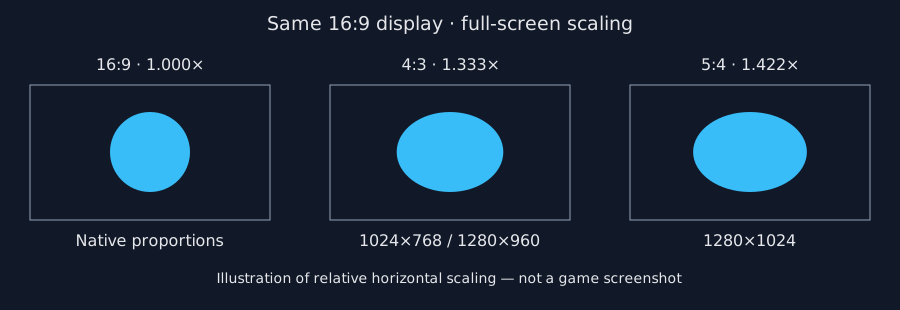
Stretched resolution means you run a non-native aspect ratio (usually 4:3) and force the image to fill a widescreen monitor. Player models look wider, the horizontal FOV gets narrower, and GPU load drops because you render fewer pixels than 1920×1080.
CS2 does not always stretch for you. Most players still need GPU scaling (NVIDIA / AMD “Full-screen” / “Full panel”) so black bars disappear. If you only change the in-game resolution and still see bars, the driver scaling mode is wrong — not the game.
Most-used CS2 resolutions (live pro data)
| # | Resolution | Pros | Share | Usage |
|---|---|---|---|---|
| 1 | 1280x960 | 240 | 62.7% | |
| 2 | 1024x768 | 41 | 10.7% | |
| 3 | 1920x1080 | 33 | 8.6% | |
| 4 | 1280x1024 | 20 | 5.2% | |
| 5 | 1440x1080 | 15 | 3.9% | |
| 6 | 1680x1050 | 10 | 2.6% | |
| 7 | 1152x864 | 9 | 2.3% | |
| 8 | 2560x1440 | 3 | 0.8% | |
| 9 | 1280x800 | 3 | 0.8% | |
| 10 | 1600x900 | 2 | 0.5% | |
| 11 | 1280x768 | 2 | 0.5% | |
| 12 | 800x600 | 1 | 0.3% |
Aspect ratio & scaling mode among pros
Aspect ratio
- 4:3 — 305 pros (79.6%)
- 16:9 — 39 pros (10.2%)
- 5:4 — 23 pros (6%)
- 16:10 — 15 pros (3.9%)
- 5:3 — 1 pros (0.3%)
Scaling mode
- Stretched — 312 pros (81.5%)
- Native — 38 pros (9.9%)
- Black Bars — 33 pros (8.6%)
- Unknown — 2 pros (0.5%)
Pros currently on 1280x960
- 910 (The Mongolz · Stretched)
- Ag1l (100 Thieves · Stretched)
- alex666 (B8 Esports · Stretched)
- aliStair (THUNDER dOWNUNDER · Stretched)
- allu (JANO Esports · Stretched)
- Almazer (Free Agent · Stretched)
- apEX (Team Vitality · Stretched)
- aragornN (BC.Game · Stretched)
- arrozdoce (OG Esports · Stretched)
- arT (Legacy · Stretched)
See every pro’s resolution, DPI and gear in one table →
Best stretched resolutions to try
1280×960 (4:3 stretched)
The default competitive pick. Models look larger without going fully soft, and it is the resolution you will see most often on pro streams and our database. Start here if you are switching from 16:9.
1024×768 (4:3 stretched)
The same 4:3 stretch as 1280×960 and 1440×1080 on the same display, with fewer pixels and a softer image. Lower pixel counts can improve performance when the GPU is the limiting factor; they do not guarantee higher FPS.
1440×1080 (4:3 stretched)
A 4:3 option using the full vertical pixel count of a 1080p monitor. It renders more pixels than 1280×960, with the same stretch and potentially a clearer image. Measure performance on your own system.
1280×1024 (5:4 stretched)
Stronger horizontal stretch than 4:3 when both fill a 16:9 display. The horizontal-to-vertical scaling ratio is about 1.42 for 5:4, compared with 1.33 for 4:3. The number of pixels affects clarity and workload; the aspect ratio determines the stretch.
How to set up stretched resolution in CS2
- Open CS2 → Settings → Video.
- Set Display Mode to Fullscreen (not windowed).
- Set Aspect Ratio to 4:3 (or 5:4 / 16:10 if that is your target).
- Pick the resolution (1280×960 is the usual start).
- Apply, then force GPU scaling so the image fills the monitor:
- NVIDIA Control Panel → Display → Adjust desktop size and position → Scaling: Full-screen → Perform scaling on: GPU.
- AMD Software → Display → Scaling Mode: Full panel.
- Launch a deathmatch and re-check crosshair feel — stretched changes perceived thickness and flick distance.
Stretched vs native: which should you pick?
- Pick stretched if you already aim well on 4:3, want larger models, or need FPS headroom on a mid PC.
- Pick native 16:9 if you are new, hate FOV loss, play multiple FPS titles, or do not want driver scaling hassle.
There is no free lunch: stretched trades peripheral vision for wider models. Pros win on both — copy their resolution only if you are willing to re-learn movement and utility lineups for a week or two.
FAQ
What is the best stretched res for CS2 in 2026?
1280x960 is the most common resolution in our database sample (63%), but popularity alone does not determine what works best for you. Compare clarity, field of view and frametimes on your own setup.
Does stretched resolution increase FPS?
Stretching itself does not guarantee higher FPS. Rendering fewer pixels can help when the GPU is the bottleneck, but CPU-limited systems may see little improvement. Compare frametimes using the same scene and settings.
Is stretched res cheating in CS2?
No. It is a visual preference allowed in competitive play. It changes how the game looks, not hitboxes or server rules.
Why do I still see black bars?
Your GPU is using “Aspect” / “Maintain aspect ratio” scaling. Switch NVIDIA/AMD scaling to Full-screen / Full panel and set scaling to GPU, then relaunch CS2 in fullscreen.
Will stretched break my crosshair?
It can feel thicker or thinner because the image is warped. Copy a crosshair from a pro on the same resolution, or rebuild one in our generator after you settle on a res. Crosshair generator
Next steps
- CS2 pro settings list — filter by resolution, copy crosshair, download CFG.
- Pro rankings — most-used mice, resolutions and skins.
- Autoexec generator — lock sens/crosshair after you pick a res.
